

Upload WhatsApp Business catalog photos square, at 1080 × 1080 px. Meta shows products in 1:1, requires a minimum of 500 × 500 px, recommends 1024 × 1024 px and accepts JPG or PNG up to 8 MB. Each item takes up to 10 photos or videos and goes through a review before your customers see it.
The WhatsApp Business catalog is the closest thing to an online store that a small business has without paying for a website. The customer asks “what do you have?”, you send the catalog and they choose. But if the photos come out cropped, dark or all different sizes, the catalog looks like a garage sale.
Searches about WhatsApp catalog images showed our blog 12,163 times on Google between June 25, 2025 and October 24, 2026, according to our Search Console. The question is always the same: what size to use so the photo does not get cropped.
What size should catalog photos be?
Square, at 1080 × 1080 px. Meta shows product images in a square format and sets these rules for catalogs used in its shops:
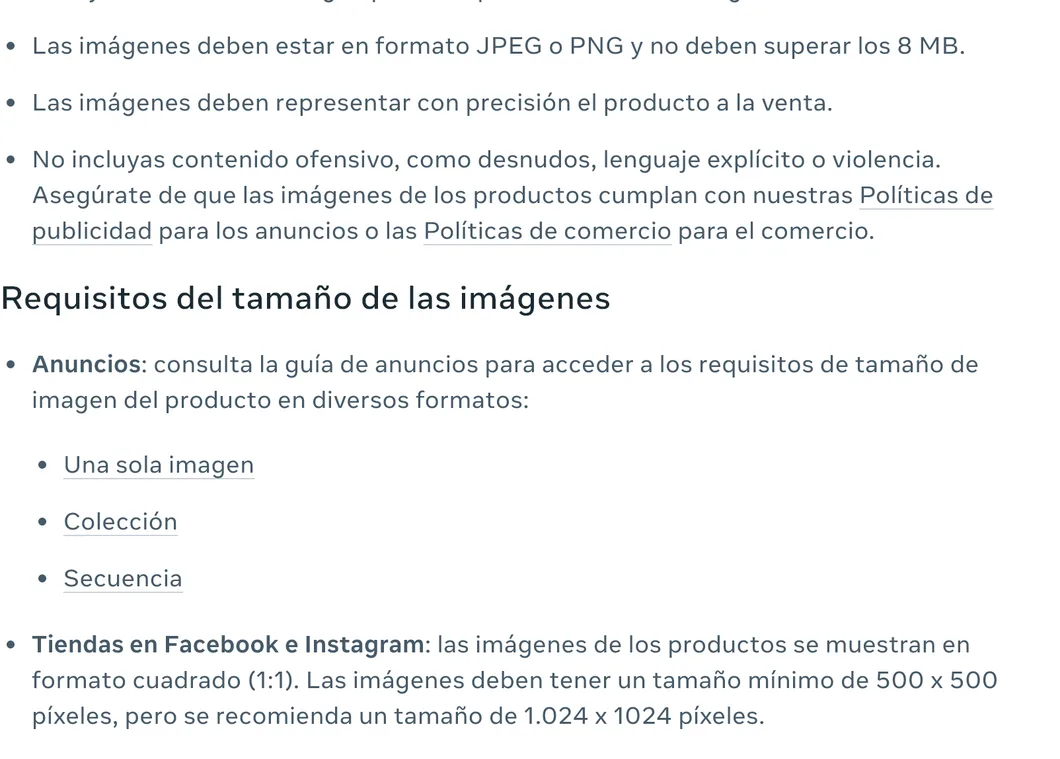
| Requirement | Value | Source |
|---|---|---|
| Thumbnail format | Square (1:1) | Meta Business |
| Minimum size | 500 × 500 px | Meta Business |
| Recommended size | 1024 × 1024 px (we use 1080 × 1080) | Meta Business |
| File | JPG or PNG, up to 8 MB | Meta Business |
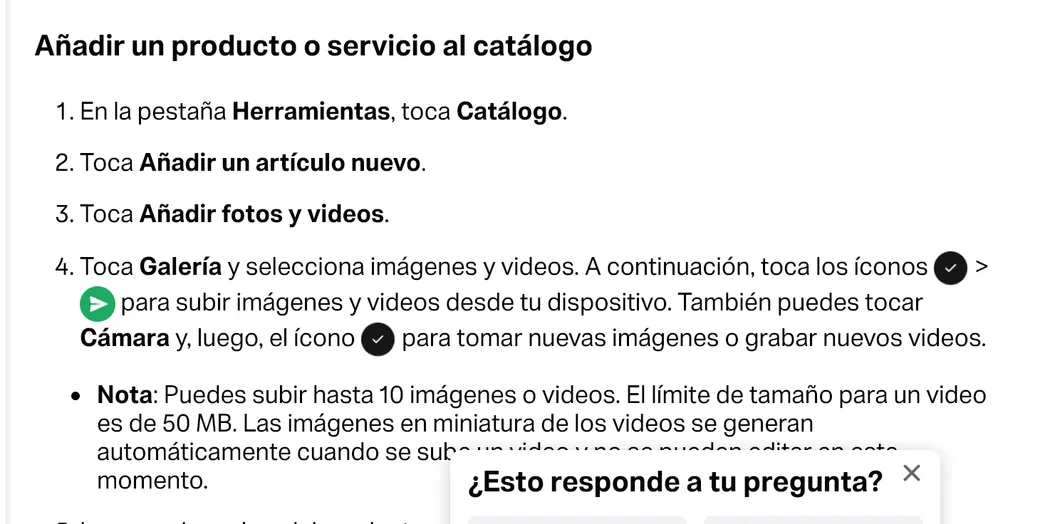
| Photos and videos per item | Up to 10 | WhatsApp Help |
| Maximum video size | 50 MB | WhatsApp Help |
Why 1080 and not 1024? Because 1080 px is the maximum width at which Instagram uploads photos, so a single image works for the catalog, the status and the post. The difference is minimal and both comply.
What happens if I upload vertical or horizontal photos?
WhatsApp accepts them, but the catalog thumbnail is square and crops to the center. In a 4:5 vertical photo of 1080 × 1350 px you lose 135 px at the top and 135 px at the bottom. In a horizontal one, you lose the sides.
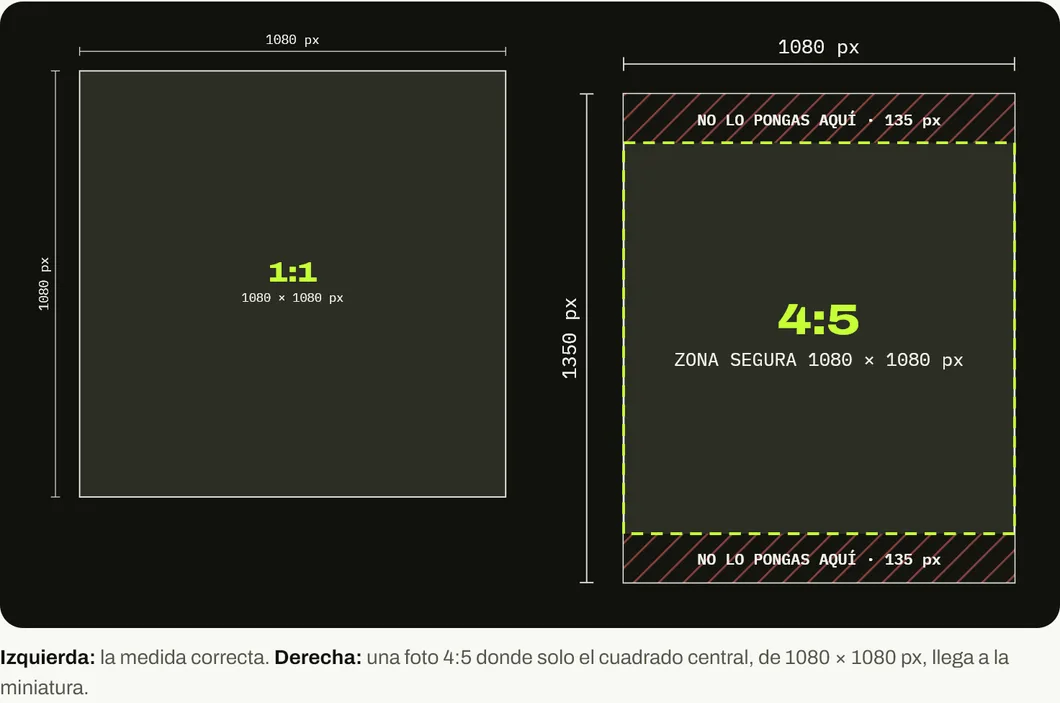
The fix is simple: frame the product in the center and leave space around it. If the photo was already taken vertically, crop it to a square yourself before uploading, so you decide what gets lost.
Why does my product not appear in the catalog?
Because every item goes through a review. WhatsApp help explains that all catalog images and videos are reviewed to confirm they comply with the WhatsApp Business Messaging Policy. While the item is pending, or if it gets rejected, your customers cannot see it.
If an item is rejected, a red exclamation mark appears next to the image. You can tap it and appeal if you think it was a mistake. When creating or editing an item you also have to enter the country of origin, which WhatsApp marks as required.
Meta adds two rules worth remembering: the image must accurately represent the product you sell, and it cannot contain offensive content. A catalog photo of a product different from the one you deliver costs you the customer’s trust.
How to photograph products with your phone
Your phone is enough. What you need is consistency, so the whole catalog looks like one family.
- Window light, from the side. Avoid direct flash and yellow ceiling light. Natural side light brings out the product’s shape.
- The same background for everything. A white card or one in your brand color. Meta notes that its automatic product cutout works best with white or transparent backgrounds.
- Camera at product height. Shoot from above only for flat things, like folded clothes or food on a plate.
- Square framing in the camera. Most phones have a 1:1 mode. If you use it, you see the final result when you shoot.
- First photo, the product alone. The rest, in use, close up or with measurements. The first one is the one that shows in the list.
- No text on top. The price and the description have their own fields in the catalog. Text over the photo looks small and competes with the product.
A catalog that sells
An organized catalog saves your customer questions and saves you time. Create collections by category, hide what you do not have in stock (WhatsApp lets you hide items without deleting them) and share the product link directly in the chat or in your status.
For the rest of the profile, check the sizes for the WhatsApp Business cover and for WhatsApp status. And for the full strategy, our guide to selling more with WhatsApp Business.
If your catalog has already grown and you need a store on your own website, connected to WhatsApp, let’s talk on WhatsApp.
Sources
Accessed on October 26, 2026.
- Meta Business. Product image specifications for catalogs.
- WhatsApp Help Center. How to create and maintain a catalog.
- WhatsApp Help Center. About the catalog.
- Instagram Help Center. Resolution of the photos you share on Instagram. Maximum width of 1080 px.
- Our own data: Google Search Console for blog.onviral.agency and for the old URLs that redirect to it, from June 25, 2025 to October 24, 2026.
Main photo: Vendeur de bijoux, by Aristidek5maya, on Wikimedia Commons, licensed under CC BY-SA 4.0. Cropped to 16:9.

Frequently asked questions
What size should WhatsApp Business catalog photos be?
Square, at 1080 × 1080 px. Meta requires a minimum of 500 × 500 px for product images and recommends 1024 × 1024 px, in JPG or PNG up to 8 MB.
How many photos can I upload per product?
Up to 10 images or videos per item, according to WhatsApp help. Videos have a 50 MB limit.
Why does a product not appear in my catalog?
Because it is still under review or was rejected. WhatsApp reviews every image and video against its WhatsApp Business Messaging Policy, and the item only shows once it is approved. If it is rejected, you will see a red exclamation mark and you can appeal.
What happens if I upload a vertical photo?
The catalog thumbnail is square, so the photo gets cropped to the center. In a 4:5 photo of 1080 × 1350 px you lose 135 px at the top and 135 px at the bottom.
Can I use the same catalog on Facebook, Instagram and WhatsApp?
Yes. WhatsApp lets you connect a Meta catalog you already have. Meta's image rules apply to that catalog.