

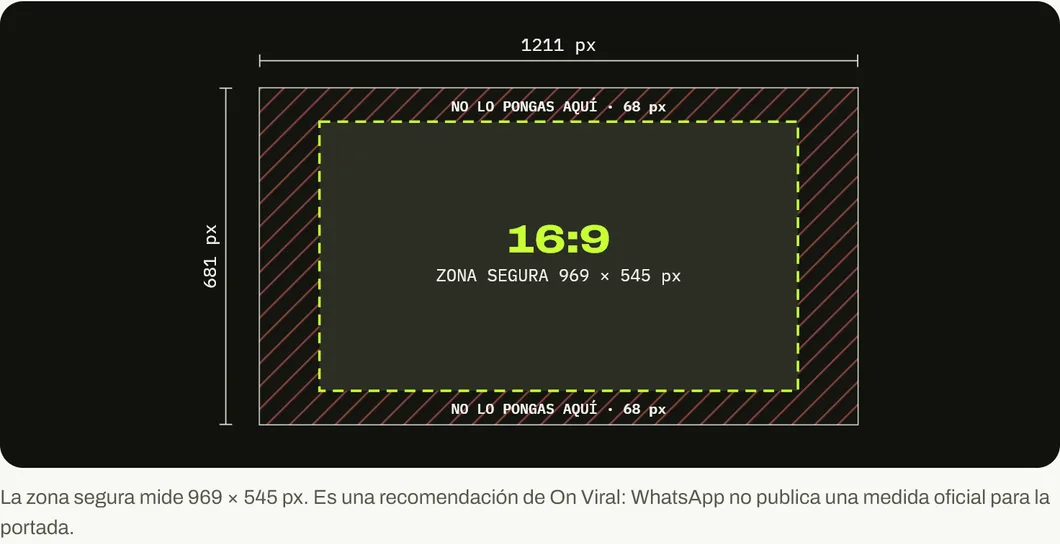
WhatsApp does not publish an official size for the WhatsApp Business cover. The most repeated one is 1211 × 681 px, in 16:9 format. Design at that size or a larger one with the same ratio, keep the logo and text inside a central 969 × 545 px zone and check the result on your own phone.
You paid a designer for the logo. You painted the storefront. And on WhatsApp Business, where your customers write to you every day, the cover is a stretched photo that cuts your name in half.
This is the question that reaches us most through Google. Between June 25, 2025 and October 24, 2026, searches about the WhatsApp Business cover showed our blog 66,081 times on Google, according to our Search Console. It is almost always the same question in different words: “whatsapp business cover size”, “whatsapp business banner dimensions”, “how big is the cover”.
Here is the size, what WhatsApp says (and what it does not) and how to design a cover that works for your business.
What size is the WhatsApp Business cover?
The most used size is 1211 × 681 pixels, in a 16:9 ratio, the same as a horizontal video. If you have a larger photo with that ratio, for example 1920 × 1080 px, it works too.
| Element | Size | Ratio | Source |
|---|---|---|---|
| WhatsApp Business cover | 1211 × 681 px | 16:9 | Beta tests; WhatsApp does not publish a size |
| Recommended safe zone | 969 × 545 px, centered | 16:9 | On Viral recommendation |
| Profile photo | Square, shown as a circle | 1:1 | Our WhatsApp guide |
| File | JPG for photos, PNG for logos and text | — | Common practice |
We have to be honest about the figure. WhatsApp does not publish the cover size. We checked its help center on October 26, 2026 and all it explains is how to upload, change or remove it.
The 1211 × 681 px figure came from the beta version tests that iMore reported when the feature appeared. Other guides give 1640 × 856 px or recommend starting from 1920 × 1080 px. All three have something in common: they are horizontal and close to 16:9. That is why the practical decision is that ratio, not an exact number.
Which part of the cover always shows?
The cover adjusts to each screen, so the edges can get cropped. To play it safe, keep everything important in the center: 969 × 545 px, with a 121 px margin on each side and 68 px at the top and bottom. That is a 10 % margin on every edge. It is our recommendation. WhatsApp does not set one, and that margin leaves plenty of room for each screen’s cropping.
There is another detail almost nobody checks: the profile photo. Your logo already lives in that circle, which appears in every chat. If you repeat it on the cover, you spend space saying the same thing twice.
What do I put on my business cover?
Think of the cover as the sign on your storefront. The person has already reached your profile because they wrote to you or someone sent them. The cover has one second to confirm they are in the right place and to tell them something useful.
What works best:
- A real photo of what you sell or where you sell it. The store, the star product or the team at work. It confirms to the customer that there is a real business behind the number.
- A single sentence, if needed. “Same-day delivery in Santiago” says more than five services in small print.
- Contrast. Light lettering on a dark background, or the other way around. On a phone screen, gray on gray disappears.
What is unnecessary:
- The phone number and email. They are already on your profile, one tap further down.
- Dated promotions. If you change the offer every week and do not change the cover, your sign is lying.
- Text less than about 40 px tall on the 1211 px canvas. On a phone it becomes unreadable.
If you hesitate between more text or a better photo, choose the photo. What you sell is better explained in the catalog and the description, which have more room.
How do you change the WhatsApp Business cover?
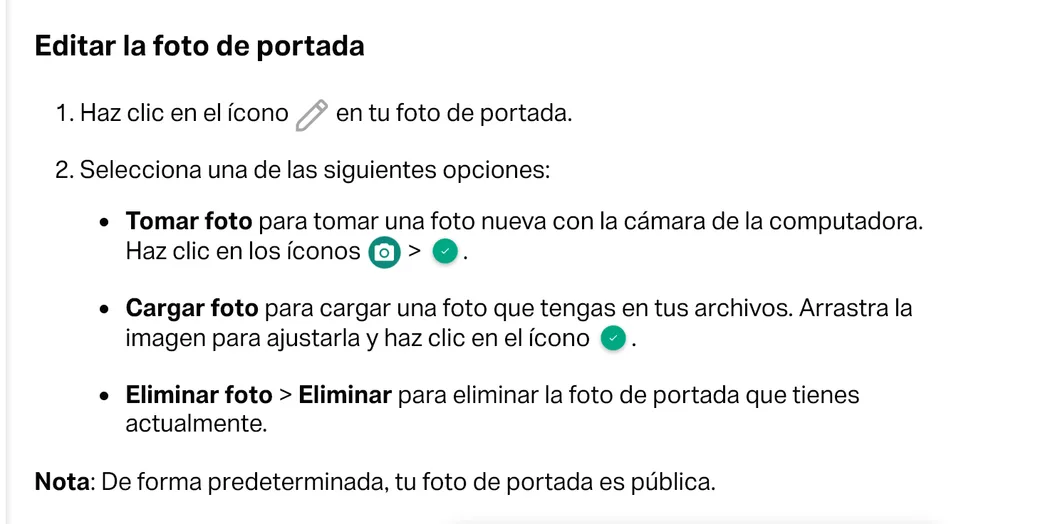
According to WhatsApp’s official help, on the web version it is done like this:
- Open your business profile.
- Tap the pencil icon over the cover photo.
- Choose Upload photo to upload an image from your files, or Take photo to use the camera.
- Drag the image to adjust it and confirm with the check icon.
To remove it, choose Remove photo and confirm. WhatsApp clarifies that some profile details, such as the name and number, can only be edited from the phone app.
The 4 most common mistakes
Using a vertical photo. If you upload a photo taken vertically, WhatsApp forces you to crop a horizontal strip and you almost always lose the part that mattered. Take the photo horizontally from the start.
Designing at the exact size and nothing more. A 1211 × 681 px image can look soft on phones with high-density screens. If you design it at double the size (2422 × 1362 px) with the same ratio, you have room for compression.
Putting the logo in a corner. Corners are the first thing to get cropped. The logo goes toward the center or, better, in the profile photo.
Not looking at it on a phone. It seems obvious. Even so, it is easy to design on a computer and forget the customer will see it on a six-inch screen.
The cover is one piece of the machine
A well-made cover helps the customer who has already arrived trust you a little more. The sale is closed by a quick reply, an organized catalog and what happens after the first message. If you want the full picture, start with our WhatsApp Business guide for companies and with how to sell more with WhatsApp Business.
And if you want someone to review your full business profile, with cover, catalog and automatic messages, message us on WhatsApp.
Sources
Accessed on October 26, 2026.
- WhatsApp Help Center. How to edit your business profile.
- iMore. WhatsApp is testing allowing businesses to add a cover photo. Beta version report with the 1211 × 681 px size.
- Spurnow. WhatsApp image size. Notes that WhatsApp does not publish the cover size.
- Imresizer. Resize image for WhatsApp Business cover. Suggests 1640 × 856 px.
- Our own data: Google Search Console for blog.onviral.agency and for the old URLs that redirect to it, from June 25, 2025 to October 24, 2026.
Main photo: Tentacion Gift Shop and Street Scene - San Jose de Ocoa - Dominican Republic, by Adam Jones, Ph.D., on Wikimedia Commons, licensed under CC BY-SA 3.0. Cropped to 16:9.

Frequently asked questions
What is the official WhatsApp Business cover size?
WhatsApp does not publish it. Its help center explains how to upload, change and remove the cover, but gives no pixels. 1211 × 681 px is the most repeated size and comes from tests of the beta version.
Can everyone see the WhatsApp Business cover?
Yes. WhatsApp states that, by default, the cover photo is public. Treat it like your business's sign.
Can I put text on the cover?
You can, but little and large. The cover looks small on a phone and adjusts to each screen. A short sentence in the center works better than a list of services.
Which file format do I use?
JPG for photos and PNG if the cover has a logo or lettering, because PNG keeps edges better. Always check how it looks after uploading, because WhatsApp compresses images.
Can the cover be changed from a computer?
Yes. WhatsApp help describes how to do it from the web version: you tap the pencil over the cover and choose take a photo, upload one or remove the current one.