
A WhatsApp status is designed at 1080 × 1920 px, vertical 9:16, the format of a phone screen. Keep text inside a central zone of 960 × 1420 px. WhatsApp does not support HD quality in status updates and videos can last up to 90 seconds.
You designed a promotion, posted it as a status and your contacts saw half a sentence. The price ended up under the reply bar and the logo behind your profile photo.
You are not the only one with that question. Searches about WhatsApp status size showed our blog 28,045 times on Google between June 25, 2025 and October 24, 2026, according to our Search Console. And only 6 people clicked: most want the number and leave. So the number comes first.
What size is a WhatsApp status?
1080 × 1920 pixels, vertical 9:16. It is the ratio of most phone screens, which is why a status designed this way fills the whole screen.
| What you upload | Recommended size | How it looks |
|---|---|---|
| Vertical image | 1080 × 1920 px (9:16) | Full screen |
| 4:5 image | 1080 × 1350 px | With bands at the top and bottom |
| Square image | 1080 × 1080 px | With large bands, it looks small |
| Video | Vertical 9:16, up to 90 seconds | Full screen |
WhatsApp does not publish a pixel size for status updates. 1080 × 1920 px is the standard for a vertical phone screen and the one Instagram, Facebook and TikTok use for their stories and videos.
Which part of the status does WhatsApp cover?
When someone opens your status, WhatsApp places your name and the progress bar on top, and the reply field at the bottom. Whatever sits there is hard to read or not readable at all.
Our recommendation is to leave 250 px free at the top and bottom, and 60 px on each side. That leaves you a safe zone of 960 × 1420 px in the center. It is a conservative figure of ours: WhatsApp does not publish one, and each phone divides the screen a little differently.
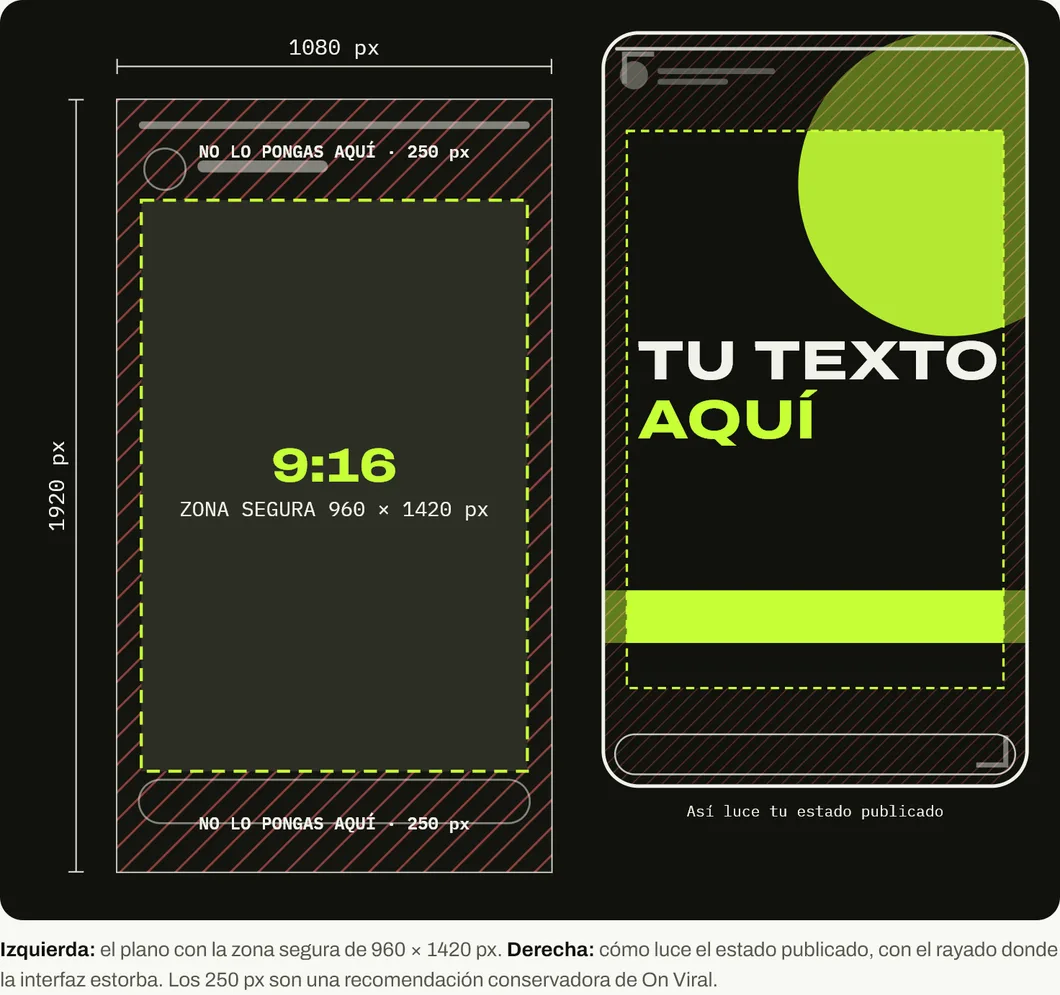
As a reference, Meta asks for something similar for Facebook stories: a margin of 14 % at the top, 35 % at the bottom and 6 % on the sides, according to its ads guide. On a 1080 × 1920 canvas that is about 269 px at the top, 672 px at the bottom and 65 px on each side. If your status has a button or a price, move it toward the center.
Why do my status updates look blurry?
Because WhatsApp compresses them, and there is no HD quality in status updates. Its help center says so plainly:
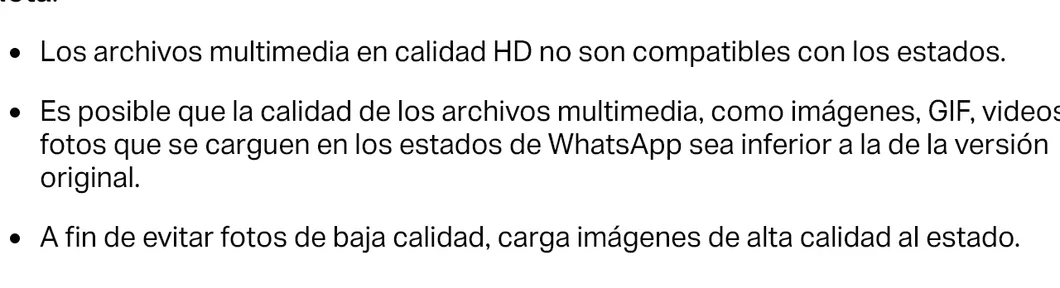
You cannot avoid compression, but you can make it affect you less:
- Upload the image at exactly 1080 × 1920 px. If you upload something huge, WhatsApp shrinks it its own way. If you upload something small, it enlarges it and it pixelates.
- Use thick, large lettering. Thin typefaces and text under about 50 px tall on the canvas are the first things to fall apart.
- Avoid soft gradients and very detailed backgrounds. Compression turns them into blotches.
- Export as a good-quality JPG, or as PNG if it is pure text. PNG keeps letter edges better.
How long can a status video be?
Up to 90 seconds, in 3GP or MPEG-4 format. If the video is longer, WhatsApp lets you trim it with a slider before posting, and you can also turn it into a GIF.
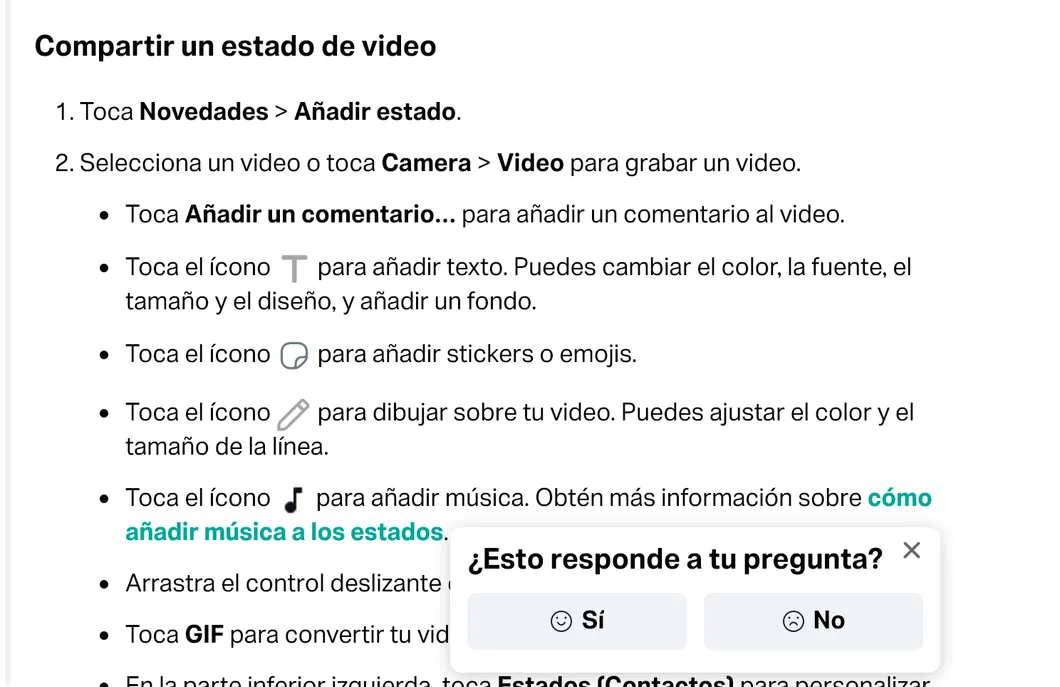
A vertical video of 15 to 30 seconds with the main idea in the first 3 seconds performs better than a 90-second one that takes a while to get going. Your contacts’ thumbs move to the next status as soon as they get bored.
How to use status updates to sell without wearing out your contacts
Status updates last 24 hours and are seen by whoever you choose. That combination makes them a very good shop window for a small business, as long as they do not turn into a billboard.
- One status, one idea. One product, one price, one date. If you need to explain more, let them write to you.
- Alternate selling and real life. The product arrived, the order went out, the store opened early. Customers buy more easily when they see there is someone behind it.
- Put the call to action in the safe zone. “Reply STATUS and I’ll send you the price” works because the reply lands in the chat.
- Check who viewed it. WhatsApp shows you who viewed your status. That list is people who have already shown interest.
If you want to go beyond status updates, here is our WhatsApp Business guide for companies and the sizes for the WhatsApp Business cover. All WhatsApp sizes together, with drawings, are in the WhatsApp size guide.
And if you would rather have someone build a status calendar with you that sells without tiring people out, message us on WhatsApp.
Sources
Accessed on October 26, 2026.
- WhatsApp Help Center. How to create and share a status.
- WhatsApp Help Center. How to send media. States that HD content is not available for status or profile photos.
- Meta Business. Ads guide: Facebook story image. Margins of 14 %, 35 % and 6 %.
- Our own data: Google Search Console for blog.onviral.agency and for the old URLs that redirect to it, from June 25, 2025 to October 24, 2026.
Main photo: Whatsapp texting, by Helar Lukats, on Wikimedia Commons, licensed under CC BY-SA 4.0. Cropped to 16:9.

Frequently asked questions
Why does my WhatsApp status look blurry?
Because WhatsApp compresses what you upload and does not support HD quality in status updates. Its help center says so. Upload the image at good resolution and avoid small or thin lettering, which is the first thing to fall apart.
How long can a WhatsApp status video be?
Up to 90 seconds, according to WhatsApp's official help. The supported formats are 3GP and MPEG-4. You can trim the video with the slider before posting it.
Can I upload a horizontal or square image to my status?
Yes. WhatsApp shows it in full with bands at the top and bottom, so it looks small. If you design for status, work vertically.
How long does a status last?
24 hours. After that it disappears from your contacts' view.
Who sees my status updates?
Whoever you choose. WhatsApp lets you set the audience for your status or mention specific people and groups.