
Instagram uploads photos at a maximum width of 1080 px and keeps ratios between 1.91:1 and 3:4, that is, from 1080 × 566 to 1080 × 1440 px. For the feed, use 1080 × 1440 (3:4), which shows in full in the profile grid, or 1080 × 1350 (4:5). Reels and stories go at 1080 × 1920 px (9:16).
Your Instagram profile grid is your business’s shop window. And since Instagram switched its thumbnails from square to rectangular, many shop windows ended up with cut-off heads and half-visible text.
The good news is that on Instagram the underlying rule is published. Its help center explains which widths and ratios it keeps. With that and a couple of calculations, you know exactly what gets cropped and where.
What sizes does Instagram accept for photos?
This is what the Instagram help center says, checked on October 26, 2026:
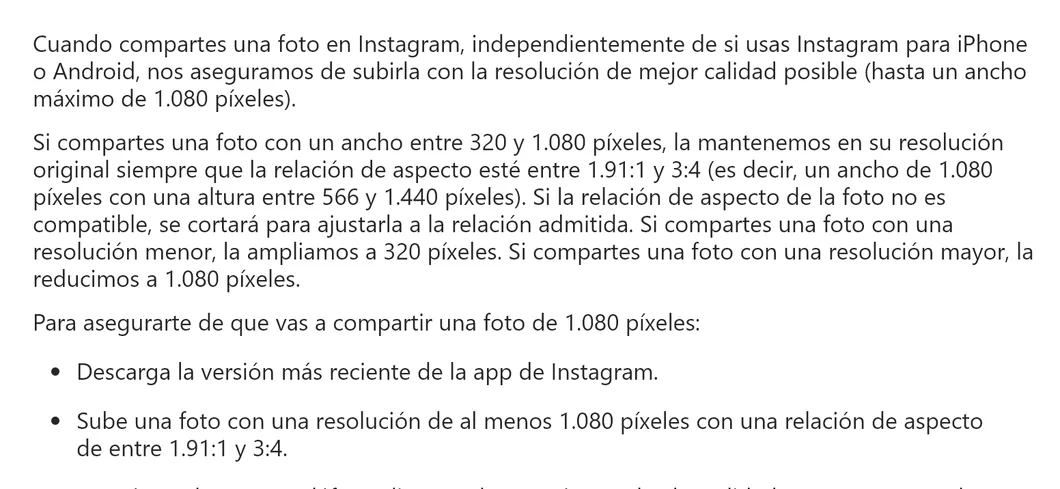
In short:
- Width: up to 1080 px. If you upload more, Instagram scales down. If you upload less than 320 px, it enlarges to 320 px.
- Ratio: between 1.91:1 (horizontal) and 3:4 (vertical). Outside that range, Instagram crops.
- Maximum height at 1080 wide: 1440 px.
Instagram sizes in one table
| Format | Size | Ratio | What to keep in mind |
|---|---|---|---|
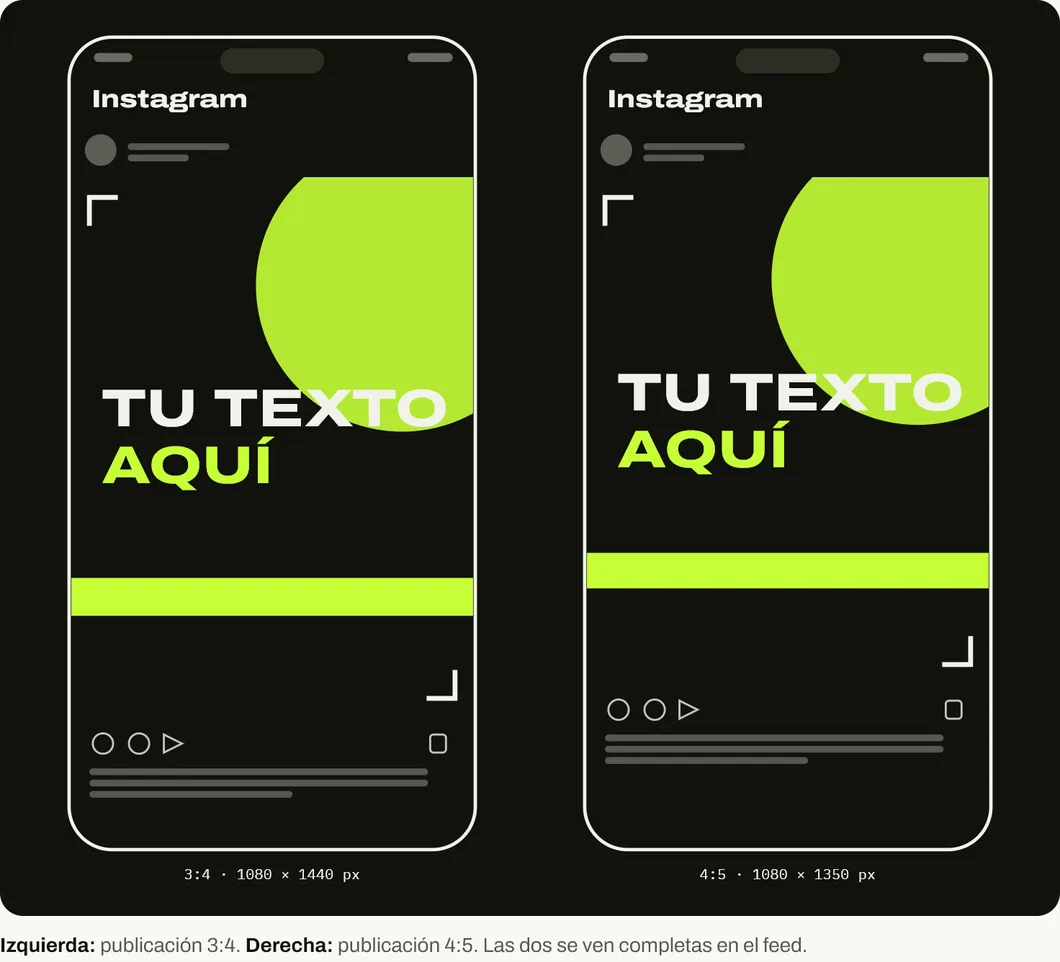
| Vertical post | 1080 × 1440 px | 3:4 | Shows in full in the grid |
| Classic vertical post | 1080 × 1350 px | 4:5 | Loses 36 px per side in the grid |
| Square post | 1080 × 1080 px | 1:1 | Loses 180 px per side in the grid |
| Horizontal post | 1080 × 566 px | 1.91:1 | Takes up little screen |
| Reel | 1080 × 1920 px | 9:16 | Top and bottom edges covered |
| Story | 1080 × 1920 px | 9:16 | Top and bottom edges covered |
| Profile photo | Square | 1:1 | Shown as a circle |
What gets cropped in the profile grid?
Profile grid thumbnails are 3:4. A 3:4 post fits in full. The others get cropped at the sides to fit that rectangle.
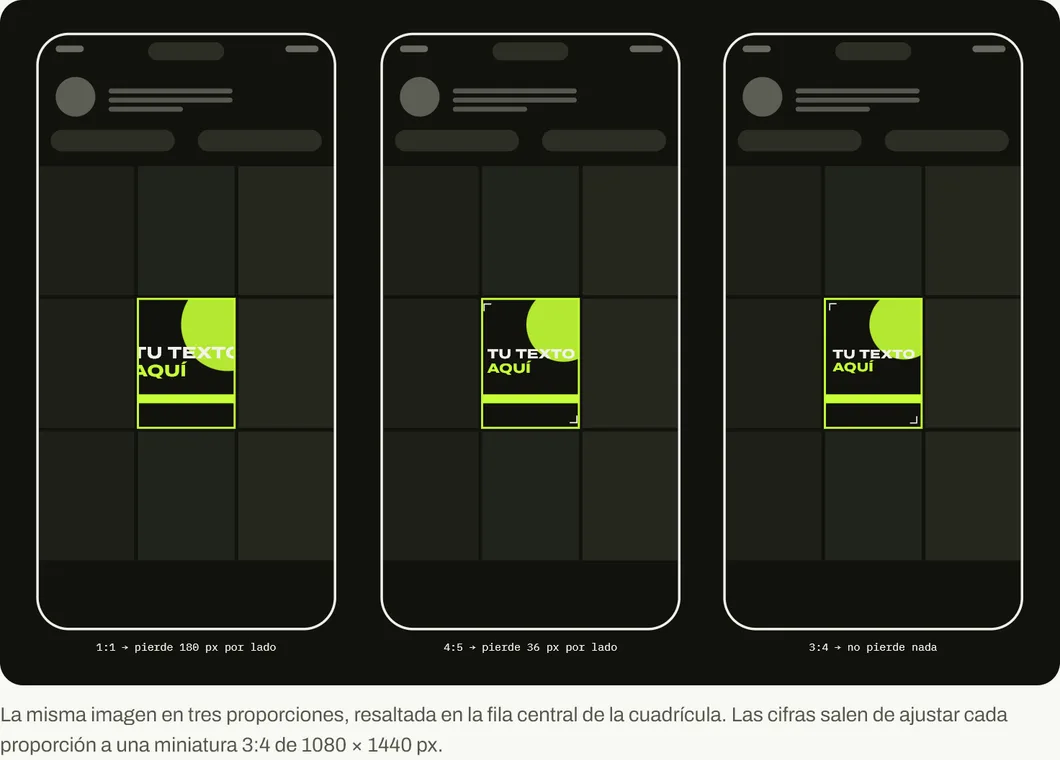
That is why our recommendation for the feed is 1080 × 1440 px. It is the tallest ratio Instagram keeps, it takes up more screen in the feed and it looks the same on your profile. If you already have templates at 1080 × 1350 px, they still work: just leave 36 px of space on each side.
What size do Reels and stories use?
1080 × 1920 px, vertical 9:16. The problem is what Instagram puts on top: the name and icons at the top, and the caption, the audio and the buttons at the bottom and on the right.
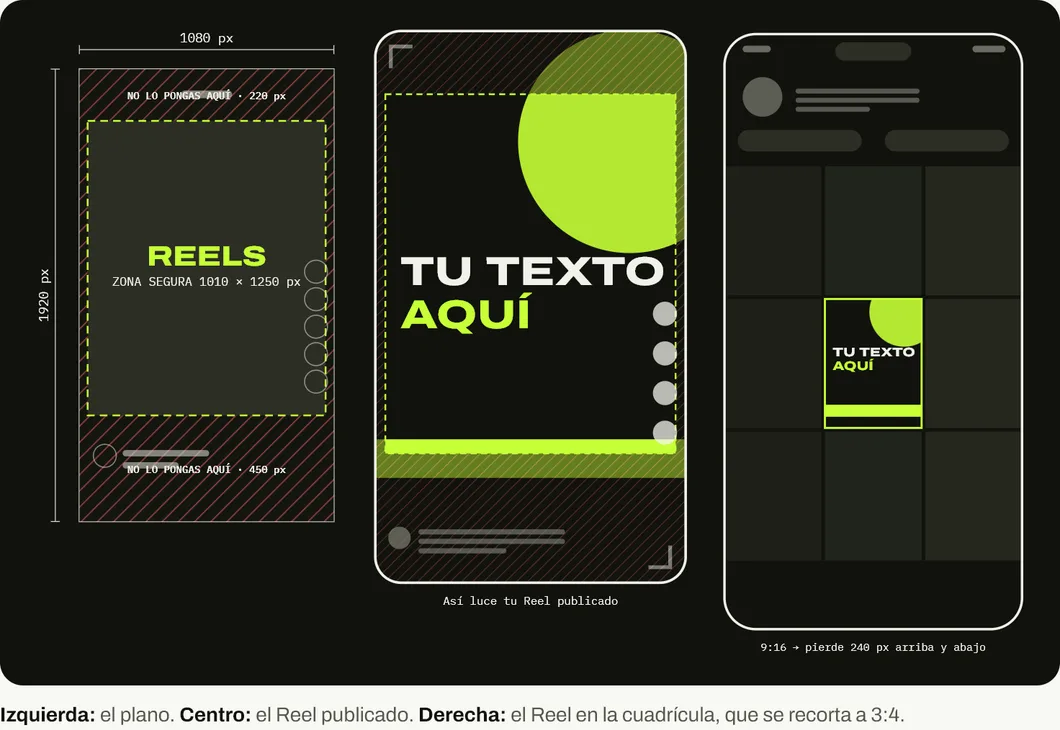
Instagram does not publish those margins for regular posts. The ones in the image come from third-party guides that measured the interface. As an official reference, Meta asks for a margin of 14 % at the top, 35 % at the bottom and 6 % on the sides for its story ads, which is similar. If your Reel has text, move it toward the center.
Another detail: the Reel cover shows in the grid cropped to 3:4. If you choose a cover with text, put it in the center.
Common mistakes on business profiles
Square templates from years ago. In the current grid they lose 180 px per side. If the text reached the edge, it no longer reads.
Photos over 1080 px “so they look better”. Instagram scales them down anyway. What counts is the sharpness of the original and not having small text.
Carousels with mixed sizes. All photos take the ratio of the first one. If you mix them, they get cropped.
Reel text in the bottom strip. That is where the caption and the audio go. Whatever you put in that area gets covered.
If your Instagram is not bringing customers, first check how to optimize your Instagram bio and why a business’s social media fails. For the other networks, see the Facebook sizes and the LinkedIn sizes.
And if you want your posts to lead to a website that turns those visits into customers, see what we do at On Viral.
Sources
Accessed on October 26, 2026.
- Instagram Help Center. Resolution of the photos you share on Instagram.
- Meta Business. Ads guide: Facebook story image. Margins of 14 %, 35 % and 6 %.
- Topia Supply. Instagram Sizes Guide 2026 (document received by On Viral). Reel margins (220, 450 and 35 px) used in our drawing.
- Sked Social. Best Instagram image and video size recommendations. 3:4, 4:5 and 9:16 sizes.
Main photo: Instagram app on smartphone, by Santeri Viinamäki, on Wikimedia Commons, licensed under CC BY-SA 4.0. Cropped to 16:9.

Frequently asked questions
What is the best size for an Instagram post?
1080 × 1440 px in 3:4. It is the tallest ratio Instagram keeps without cropping and the same one as the profile grid thumbnails. 1080 × 1350 px (4:5) also works, but loses a strip in the grid.
What happens if I upload a photo wider than 1.91:1 or taller than 3:4?
Instagram crops it to fit a supported ratio, according to its help center. Crop it yourself before uploading so you choose what gets lost.
Why does my photo look blurry on Instagram?
If the photo is under 320 px wide, Instagram enlarges it to 320 px and it loses sharpness. If it is over 1080 px, it shrinks it. Upload photos at 1080 px wide.
What size are Reels and stories?
1080 × 1920 px vertical 9:16. Keep the top and bottom edges free, where Instagram places the name, the caption and the buttons.
What size do I use in a carousel?
Carousel photos share the ratio of the first one. Design them all at the same size, for example 1080 × 1440 px, so none gets cropped.