
A LinkedIn company page cover is 1512 × 256 px and the logo, 400 × 400 px (PNG or JPG up to 3 MB). A personal profile banner is 1584 × 396 px and up to 8 MB. For posts with an image, LinkedIn indicates 1200 × 627 px horizontal, and in its ads it accepts square and 4:5 vertical.
If you search for “LinkedIn sizes”, you will find three answers for a company cover: 1128 × 191 px, 4200 × 700 px and 1512 × 256 px. All three appear in serious guides. The one LinkedIn publishes today in its help center is the third.
We checked LinkedIn Help on October 26, 2026, in Spanish and in English. Both versions say the same: 1512 × 256 px. The guides that repeat 1128 × 191 px stuck with the previous size.
Searches for LinkedIn sizes showed our blog 3,982 times on Google between June 25, 2025 and October 24, 2026, at an average position of 4. Even so, there were only 3 clicks. If the short answer is not enough, here is the long one, with the source.
LinkedIn sizes in one table
All figures come from LinkedIn’s help centers.
| Element | Size | File size and format |
|---|---|---|
| Company page cover | 1512 × 256 px | PNG or JPG, up to 3 MB |
| Company logo | 400 × 400 px (minimum 268 × 268) | PNG or JPG, up to 3 MB |
| Personal profile banner | 1584 × 396 px | JPG or PNG, up to 8 MB |
| Life tab main image | 1128 × 376 px | PNG or JPG, up to 3 MB |
| Company photos | 900 × 600 px (minimum 264 × 176) | PNG or JPG, up to 3 MB |
| Horizontal post | 1200 × 627 px (1.91:1) | — |
| Square ad | 1200 × 1200 px | Up to 5 MB |
| Vertical ad | 720 × 900 px (4:5) | Up to 5 MB |
What size is a company page cover?
1512 × 256 px. LinkedIn gives that figure as both the minimum and the recommended size, in PNG or JPG up to 3 MB.
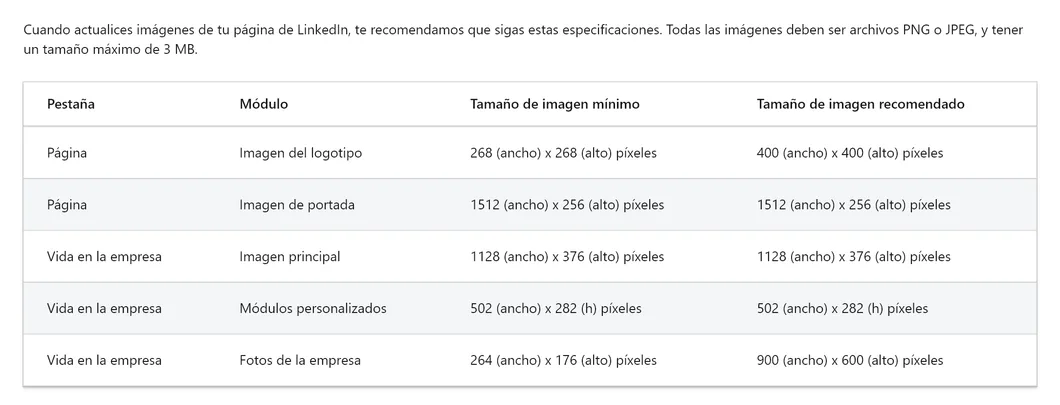
The same page gives three tips worth following to the letter:
- The cover adjusts to each screen and can be cropped horizontally or vertically. Upload the image at the best possible quality and with little text.
- Keep key details away from the edges, especially the bottom right corner. What matters goes in the center.
- Use photos. LinkedIn says photos look clearer than images with logos. If it looks blurry, try a larger file or compress it with a tool like Trimage or ImageOptim.
With a Premium Company Page subscription, the cover can be a slideshow of several images.
What size is a personal profile banner?
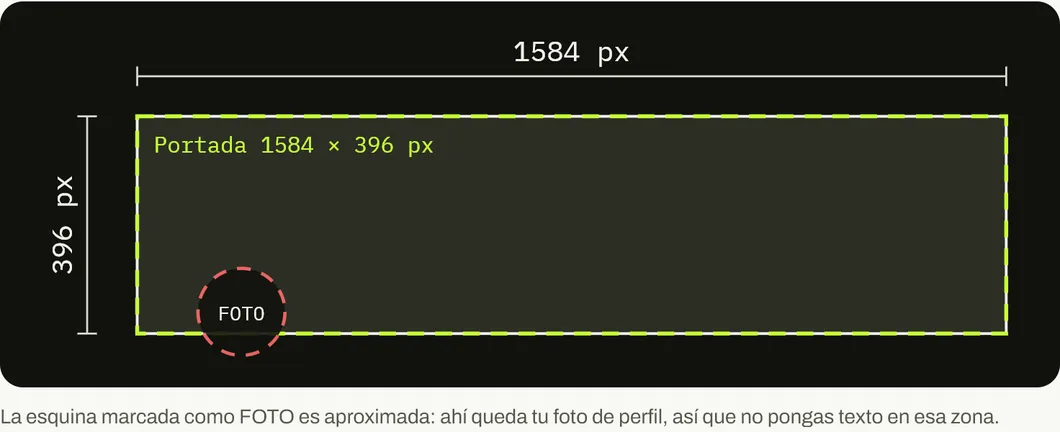
1584 × 396 px, in a 4:1 ratio, with a file size of 8 MB or less. It is the image that appears behind your profile photo.
As a business owner, that banner works for you. A banner with your business, your team or a sentence saying who you help gives context to every visit.
One detail: the profile photo covers part of the left side of the banner. Text goes to the right or in the center.
What size do I use for posts?
LinkedIn’s Pages help indicates 1.91:1, that is, 1200 × 627 px, with a width of more than 200 px. If the image is narrower, it appears as a thumbnail to the left of the post. On phones, LinkedIn does not crop images: those with other ratios show in full with white padding.
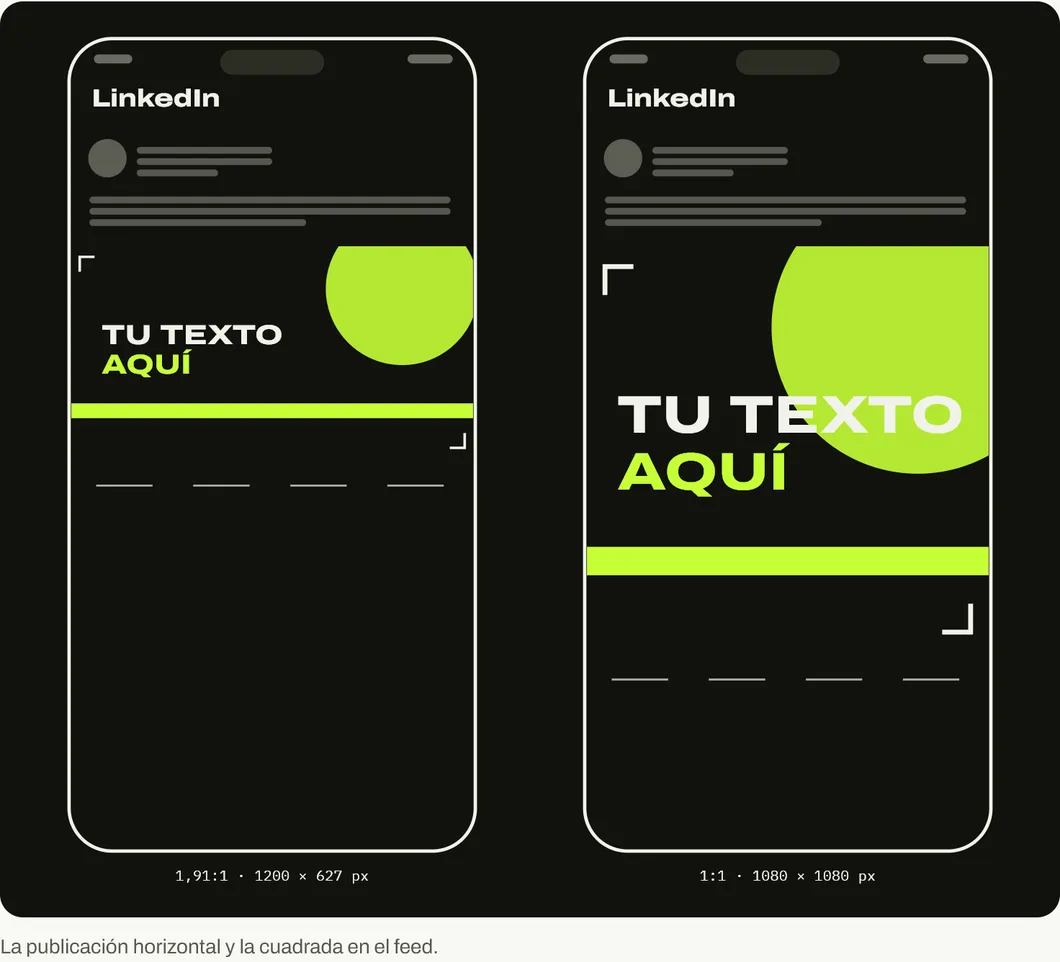
That said, the horizontal one takes up the least screen. In its ad specifications, LinkedIn accepts 1200 × 1200 px square and 4:5 vertical (720 × 900 px recommended), and says it recommends vertical ones, although they are only published on phones. For an organic post you want people to see, the square is the safe bet.
Mistakes that make a company look unprofessional on LinkedIn
Using the old cover size. A 1128 × 191 px image stretched to 1512 × 256 looks soft. Design at the current size.
A transparent-background logo on gray. Check how your logo looks in the profile circle or square. If it gets lost, use a solid background.
A cover with text against the edges. It gets cut on phones. LinkedIn warns about it in its own help.
Posting only links. A link generates a small horizontal image. Your own square image with a clear idea takes up more screen.
If LinkedIn is part of how you get customers, the page is only the entrance. Also check why a business’s social media fails and our Facebook sizes. Every network, with drawings, is in the social media size guide.
And if your website does not live up to your LinkedIn profile, see what we do at On Viral.
Sources
Accessed on October 26, 2026.
- LinkedIn Help. Image specifications for your LinkedIn Pages and Career Pages. Spanish version: Especificaciones de imágenes de tus páginas de LinkedIn y páginas de empleo.
- LinkedIn Help. Add or change your profile background photo.
- LinkedIn Marketing Solutions Help. Single image ad specifications.
- Our own data: Google Search Console for blog.onviral.agency and for the old URLs that redirect to it, from June 25, 2025 to October 24, 2026.
Main photo: LinkedIn Headquarters Mountain View, by LPS.1, on Wikimedia Commons, in the public domain (CC0). Cropped to 16:9.

Frequently asked questions
What is the size of a LinkedIn company page cover?
1512 × 256 px, both as the minimum and the recommended size, according to LinkedIn Help checked on October 26, 2026. Many guides still say 1128 × 191 px, which was the previous size.
What size is a LinkedIn personal profile banner?
1584 × 396 px recommended, in JPG or PNG and with a file size of 8 MB or less.
What size should my company logo be on LinkedIn?
400 × 400 px recommended and 268 × 268 px minimum. All page images must be PNG or JPG up to 3 MB.
What size do I use for a post with an image?
LinkedIn indicates 1200 × 627 px (1.91:1) in its Pages help. In ads it also accepts 1200 × 1200 px square and 4:5 vertical, which take up more screen on a phone.
Why does my LinkedIn cover look cropped?
Because LinkedIn adjusts it to each screen size and can crop it horizontally or vertically. LinkedIn recommends keeping key details in the center, away from the edges and especially from the bottom right corner.