
A TikTok video is recorded vertically in 9:16, at 1080 × 1920 px, as MP4 with H.264. TikTok accepts between 23 and 60 fps and files up to 4 GB. All creators can post 3-minute videos and some have 5 or 10. Keep text away from the bottom and right edges, where the caption and the buttons go.
On TikTok everyone records vertically, so the size question is solved quickly. The challenge is what TikTok puts on top: the name, the caption, the audio, the follow button, the hearts. If your price or your call to action falls there, nobody sees it.
Here are TikTok’s official sizes, checked on October 26, 2026, and a practical safe zone so your message does not end up behind the buttons.
TikTok sizes in one table
| What | Value | Source |
|---|---|---|
| Ratio | 9:16 vertical | TikTok Ads help |
| Recommended size | 1080 × 1920 px | Common practice |
| Minimum for in-feed ads | 540 × 960 px | TikTok Ads help |
| Formats | MP4 (recommended), WebM, MOV | TikTok for Developers |
| Codec | H.264 (recommended), H.265, VP8, VP9 | TikTok for Developers |
| Frames per second | 23 to 60 fps | TikTok for Developers |
| Image size | 360 to 4096 px per side | TikTok for Developers |
| Maximum file size | 4 GB | TikTok for Developers |
| Length | 3 minutes for everyone; 5 or 10 for some creators | TikTok for Developers |
| Photos | JPEG or WebP, up to 1080p and 20 MB | TikTok for Developers |
What does TikTok say about the video format?
TikTok’s developer documentation is the most concrete source. It covers the format, the codec, frames per second, size and length:
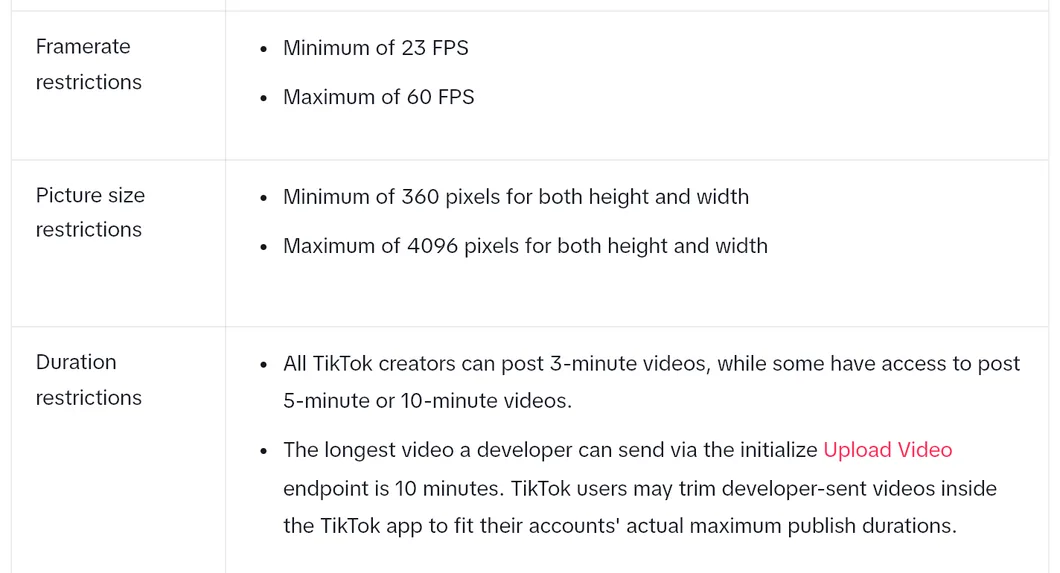
In practice:
- Record vertically, at 1080 × 1920 px. Every current phone does this in normal video mode.
- Export as MP4 with H.264. It is what TikTok recommends, and what almost any editor uses by default.
- 30 fps is fine. Go up to 60 fps only if you record fast motion.
- Check your account’s length limit. If your account has the 3-minute limit, a longer video forces you to cut.
What is the TikTok safe zone?
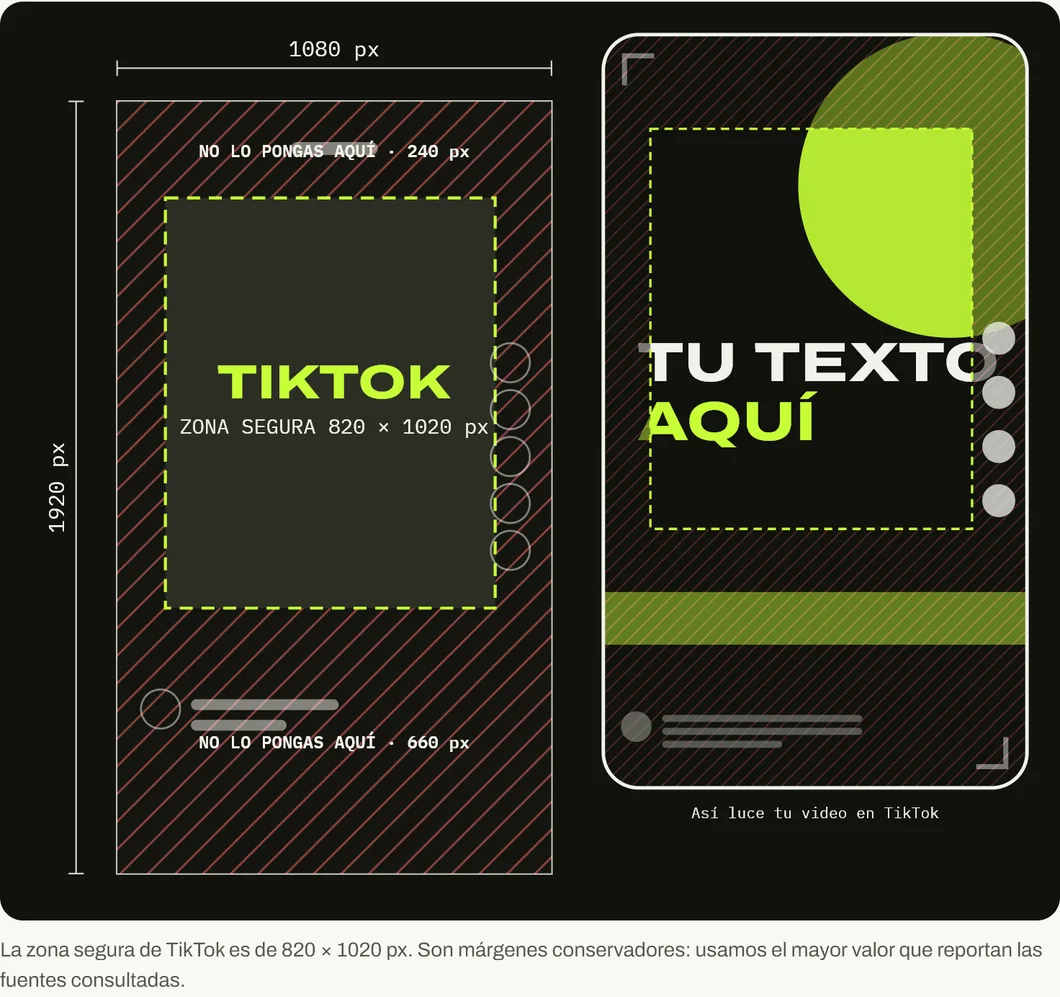
TikTok does not give a fixed figure. In its ads help it explains that the safe zone depends on the format, the caption length and the extra elements of the ad: the longer the caption, the smaller the safe zone. That is why it publishes downloadable templates for each case.
As a practical reference, in a 1080 × 1920 px video leave free:
- 240 px at the top, where the tabs and search go.
- 660 px at the bottom, where the name, the caption and the audio go.
- 120 px on the left.
- 140 px on the right, where the profile photo, hearts, comments and share go.
That leaves a zone of 820 × 1020 px. It is the most conservative figure we found in the guides that measured the interface, and the one our size guide uses.
If you advertise, download the official template from TikTok Ads Manager and check your video against it before launching.
What makes a business video work on TikTok
With the sizes sorted, this is what helps someone keep watching the video.
- The main idea in the first seconds. The thumb decides fast.
- Subtitles inside the safe zone. They help people who watch without sound.
- Real people and the real business. Show the premises, the process and the team.
- A single request at the end. “Message us on WhatsApp” or “link in bio”. One.
TikTok also accepts photos, in JPEG or WebP up to 1080p and 20 MB each, if you prefer an image carousel.
For the other networks, see the Instagram sizes, the Facebook sizes and our social media size guide. And if your videos attract views but not customers, read why a business’s social media fails.
If you want those visits to end up on a website that converts, see what we do at On Viral.
Sources
Accessed on October 26, 2026.
- TikTok for Developers. Content Posting API: Media Transfer Guide. Formats, codecs, fps, size, length and file size.
- TikTok Ads. TikTok Auction In-Feed Ads. 9:16 ratio, minimum of 540 × 960 px, up to 10 minutes and safe zone depending on format and caption.
- Socialync. TikTok safe zones. Margins of 240, 660 and 120 px.
Main photo: Young people making TikTok video 01, by Indrajit Das, on Wikimedia Commons, licensed under CC BY-SA 4.0. Cropped to 16:9.

Frequently asked questions
What is the ideal size for a TikTok video?
1080 × 1920 px vertical 9:16. For ads, TikTok asks for a minimum of 540 × 960 px vertical, but 1080 × 1920 px is the size that looks sharp on today's phones.
How long can a TikTok video be?
According to TikTok's developer documentation, all creators can post 3-minute videos and some have access to 5 or 10 minutes. In-feed ads allow up to 10 minutes.
Which video formats does TikTok accept?
MP4 (recommended), WebM and MOV, with the H.264 (recommended), H.265, VP8 or VP9 codec, between 23 and 60 fps and up to 4 GB.
What is the TikTok safe zone?
TikTok says it depends on the format, the caption length and the extra ad elements, and it publishes downloadable templates. As a practical reference, leave about 240 px free at the top, 660 at the bottom, 120 on the left and 140 on the right.
Can I upload photos to TikTok?
Yes. TikTok's documentation accepts photos in JPEG or WebP, up to 1080p and 20 MB each.